
We’ve added several new features and improvements to help teams manage shared inboxes, customer conversations and team workflows more easily in Sortd.
This update includes new AI capabilities, easier board oversight, SLA features, Custom Properties, Checklists, shared inbox improvements, and a more native Gmail experience.
AI Oversight for Boards
Sortd now includes AI-powered oversight to help teams quickly understand what needs attention across their boards.
With AI enabled, Sortd can help identify:
- Status — for example, whether something needs a response or is awaiting a reply
- Urgency — to help flag conversations that may need faster attention
- Sentiment — to help identify complaints, frustration, dissatisfaction or praise
This gives teams a faster way to spot important conversations without needing to manually review every email thread or task.
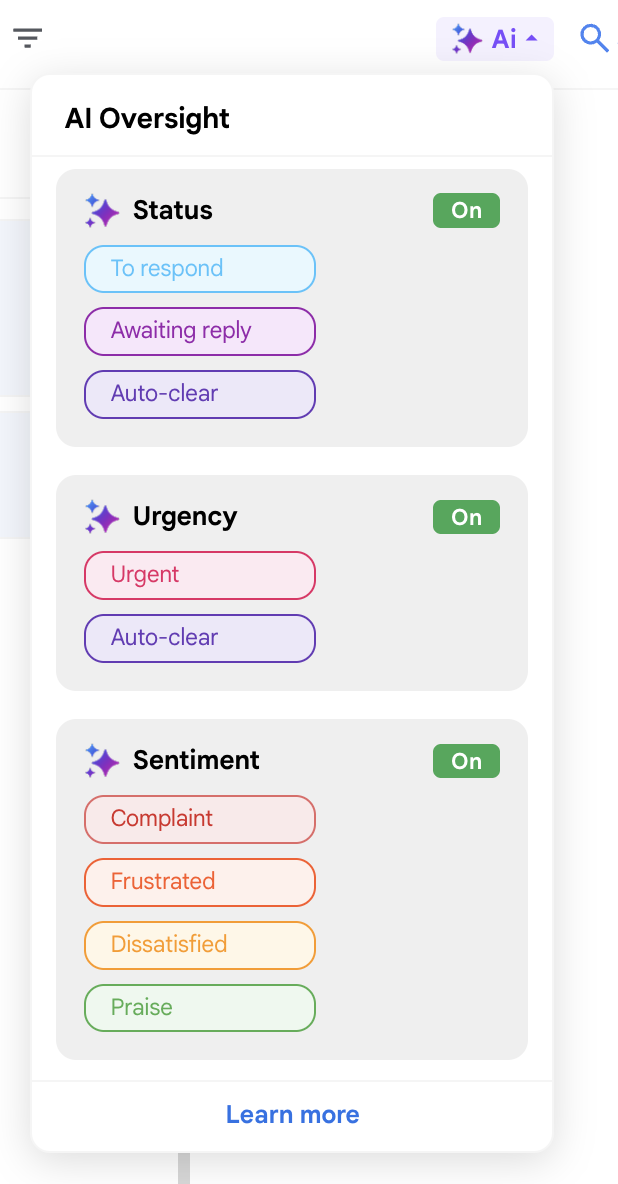
Easy AI Activation on Boards
AI can now be activated directly from your board.
From the AI Oversight panel, you can turn on AI support for:
- Status
- Urgency
- Sentiment
Once enabled, Sortd can start applying AI-powered insights to items on your board, helping your team prioritize and manage work more effectively.
AI Actions in Automations
You can also use AI inside Sortd Automations.
This allows Sortd to automatically assess items and update AI fields when something happens on a board or email thread.
AI automation actions include:
- Set status with AI
- Set sentiment with AI
- Set urgency with AI
These actions can be triggered when:
- An item is added to a board
- A reply is received on an email thread in a task
- A reply is sent from an email thread in a task
For example, your Customer Support board could automatically detect urgent replies or negative sentiment as new customer emails come in.
Learn more here:
https://sortd.freshdesk.com/support/solutions/articles/6000284602-using-ai-actions-in-sortd-automations
SLA Features
Sortd now includes SLA features to help teams stay on top of time-sensitive work.
SLA tracking is useful for customer support, sales, operations and other shared inbox workflows where response times matter.
You can use SLA features to help your team:
- Track important customer conversations
- Identify items that need attention
- Improve response-time visibility
- Keep shared inbox work moving
Custom Properties
Custom Properties allow you to customize Sortd around your team’s workflow.
You can add your own fields to cards and boards so your team can track the information that matters most to your process.
Examples include:
- Status
- Tags
- Dropdowns
- Dates
- Numbers
- Text fields
- Checklists
- Team members
- Contacts
- Files
- URLs
Custom Properties are especially useful when you want Sortd to replace spreadsheets or manual tracking tools in your workflow.
Learn more here:
https://sortd.freshdesk.com/support/solutions/articles/6000236601-custom-properties-learn-more
Checklists
Checklists help teams break work down into smaller steps directly inside Sortd cards.
They are useful for repeatable processes, handovers, approvals, onboarding, customer support steps, or any workflow where multiple things need to be completed before a task is done.
With Checklists, your team can better track progress and make sure important steps are not missed.
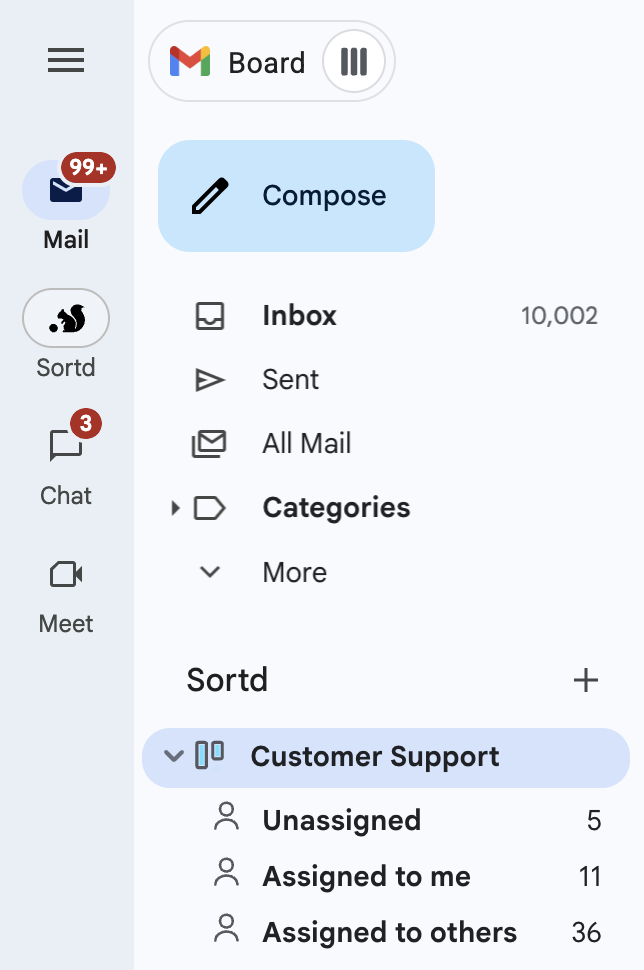
A More Native Gmail Experience
We’ve improved the way Sortd fits into Gmail.
You can now get more visibility from the Gmail sidebar without needing to open each board first.
This includes being able to see:
- Boards
- Board counts
- Assignment sections
- Unassigned items
- Items assigned to you
- Items assigned to others
This makes Sortd feel more integrated with Gmail and gives teams a faster way to understand what is happening across their shared inboxes and boards.
Shared Inbox Improvements
We’ve also made general improvements to the shared inbox experience to help teams manage incoming email more smoothly.
These improvements are designed to make it easier to:
- Triage shared inboxes
- Assign work to the right person
- Track who is responsible for what
- Keep customer conversations organized
- Improve visibility across team email workflows
Feature Availability
Some features may depend on your Sortd plan.
You can view the latest plan details here:
https://www.sortd.com/pricing
If you do not see a feature in your account, it may not be included in your current plan or may still be rolling out.
Related Articles
Using AI Actions in Sortd Automations
https://sortd.freshdesk.com/support/solutions/articles/6000284602-using-ai-actions-in-sortd-automations
Custom Properties - Learn More
https://sortd.freshdesk.com/support/solutions/articles/6000236601-custom-properties-learn-more
How do I set up email, task, and AI automations in Sortd?
https://sortd.freshdesk.com/support/solutions/articles/6000245024